SFST Report – Unofficial Tool
Bonsaisoft LLCBusiness
4.214.00 Reviews
- Version
- 1.11
- Installs
- 10.00K
- Age Rating
- Everyone
Screenshots

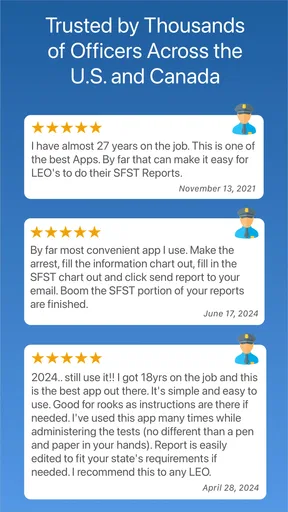
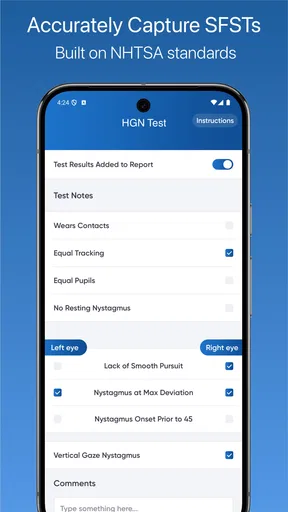
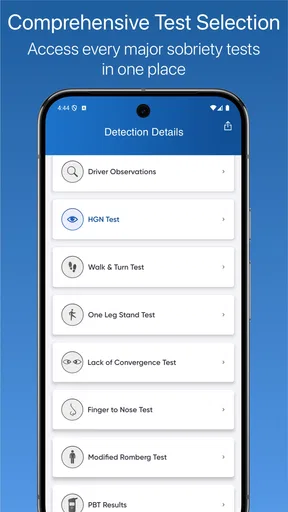
Our Review of SFST Report – Unofficial Tool
 Analysis by Appyee
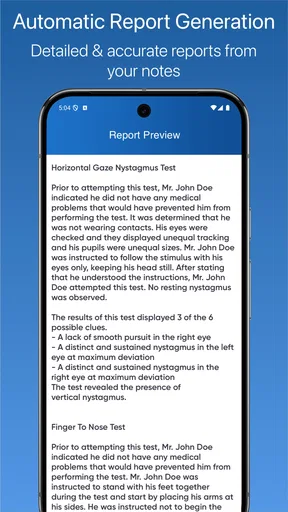
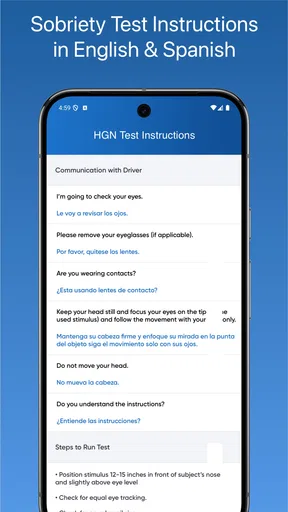
I approached SFST Report – Unofficial Tool as a practical business app rather than something meant for casual browsing. Its purpose is narrow but important: it helps document DUI-related reporting and field sobriety testing using an NHTSA-based approach. That immediately makes it more specialized than the ordinary notes app or a blank digital form. I can see the value for people who need a repeatable way to capture observations, organize a report, and avoid relying on memory after a demanding roadside encounter.
The app is developed by Bonsaisoft LLC and is available free of charge, with optional in-app purchases ranging from $1.99 to $29.99 per item. It belongs in the Business category, carries an Everyone age rating, and has reached over ten thousand installs. Its average rating is 4.2 from 35 ratings, with 14 written reviews, so there is some user feedback to consider, although this is still a relatively small app community compared with mainstream productivity tools.
How SFST Report fits into real shared work
The most convincing use case is not a family sharing the app for ordinary household tasks. It is a shared work device, a department phone, or a tablet passed between people who need to document standardized field observations. In that setting, a focused report tool can be more useful than a general-purpose note-taking app because it encourages a consistent workflow instead of leaving every user to invent their own headings and shorthand.
I imagine a realistic situation where a user finishes a roadside assessment and needs to record details while the sequence is still fresh. A blank notes page may capture the broad story, but it can also lead to skipped observations, inconsistent wording, or a report that is difficult for another person to understand later. A structured SFST-oriented tool gives the user a better starting point. The benefit is not that it replaces judgment; the benefit is that it helps turn observations into organized documentation.
That distinction matters. This is not an app I would treat as an automated decision-maker, legal adviser, or substitute for training. The person using it still has to know the relevant procedures, recognize what was actually observed, and review the finished report carefully. The NHTSA-based orientation gives the app a meaningful framework, but the quality of the result depends heavily on the user’s knowledge and accuracy.
For a household, the shared-device question is therefore mostly about context. If several people use the same Android device, I would not assume that a report created by one person is automatically separated from another person’s work. I would establish a simple routine: the person responsible for the report opens the app, completes only that person’s documentation, reviews it before leaving the device, and avoids mixing unrelated notes into the same workflow. The app can support coordination, but it should not be mistaken for a complete team-management system.
A focused alternative to ordinary notes
The usual alternative is a notes app, a word processor, or a paper form. Those options are more flexible, but flexibility is not always an advantage during a time-sensitive task. A blank document makes the user remember what belongs in the report and how to arrange it. Paper may be familiar, yet it can be harder to correct, search, or preserve neatly. SFST Report is more attractive when consistency matters more than free-form writing.
On the other hand, a general document app may be the better choice when the report needs extensive narrative, attachments, collaboration, or integration with an established records system. I would not choose this tool simply because it is digital. I would choose it when its focused reporting purpose matches the work and when the organization already has a safe process for storing and reviewing the resulting information.
Setup boundaries and the first workflow
The app runs on Android devices using version 6.0 or later, which keeps it accessible to many older phones and tablets. The current version is 1.11. That broad compatibility is useful for shared equipment, especially when a workplace does not replace every device at the same time. It also means a user can consider installing it on a dedicated older device rather than giving up a newer personal phone for work.
I would begin by deciding where the device belongs in the reporting process. Is it a personal work phone, a department tablet, or a device that several people borrow? That answer affects how carefully the user needs to separate drafts, completed reports, and any other information on the device. A shared device should have a clear handoff routine, because the app’s usefulness does not remove the need for operational discipline.
One practical tip is to agree on a naming convention before the first real report is created. The convention should make it easy for the responsible user to identify the case without putting unnecessary sensitive information into a visible title. This is not a feature claim about the app; it is a workflow safeguard. A consistent internal process can prevent confusion when several people use the same phone in one shift.
A second useful habit is to review the report immediately after completing the field observations, while the sequence is still easy to recall. I would check that the recorded details describe what was seen or heard rather than conclusions added later. A structured tool can reduce omissions, but it can also give a false sense of completeness if the user taps through it too quickly.
The free entry point makes testing easier. A team can see whether the workflow fits its needs before committing to a paid option. Still, I would examine any purchase screen carefully and decide in advance who is authorized to buy optional items. The listed purchase range, from $1.99 to $29.99 per item, is wide enough that a shared-device policy should distinguish between trying the app and approving expenditure.
Why boundaries matter more than convenience
Because this app deals with reports connected to DUI investigations, I would not treat it like a casual checklist. A household member should not open a work report out of curiosity, and a colleague should not assume that access to the device means permission to edit someone else’s documentation. Even when the phone is shared, responsibility should remain clear.
I would also keep personal use separate from professional use. Using the same app for unrelated reminders could make the reporting workflow less clear, particularly if several people take turns with the device. A dedicated device is ideal, but if that is not possible, a simple handoff checklist can help: finish the report, review it, follow the organization’s storage procedure, and leave the app ready for the next authorized user.
Another trade-off is that a lightweight specialized app may be easier to start using than a large records platform, but it may not cover every need of a larger organization. If the workplace already depends on a formal case-management or evidence system, SFST Report may work best as a focused documentation aid rather than the central record. I would confirm the local process before making it part of official operations.
Coordinating reports without confusing users
SFST Report makes the most sense when coordination happens around the app, not when the user expects the app alone to coordinate a whole team. I would assign one person to complete each report, even if another person later reviews it. That avoids the vague ownership problem that often appears when a shared device is passed around and nobody is sure who entered which detail.
A useful workflow is to separate observation from review. The first user records the encounter as accurately as possible. A supervisor or authorized colleague then checks the report against the organization’s normal procedure. The reviewer should identify unclear wording or missing context without rewriting observations into something that was not actually seen. This division makes the app more valuable because it supports a repeatable process rather than becoming a private scratchpad.
For shift work, I would use a brief handoff note outside the report itself to indicate whether a document is unfinished, ready for review, or already transferred according to policy. I would not rely on memory or on the next person opening the app and guessing what remains to be done. The tool can help create the report, but team status still needs an agreed method.
This is also where the app differs from collaborative office software. A general collaboration platform may offer comments, shared folders, and broader document management, while SFST Report is more purpose-built for the field sobriety documentation task. If the main need is simultaneous editing or centralized oversight, the broader platform may be stronger. If the main need is a guided, relevant structure at the moment of reporting, the specialized app has the clearer advantage.
My third practical insight is to create a short review checklist that sits beside the device, not inside the report. It can remind users to verify identity details according to policy, distinguish direct observations from interpretations, and confirm that the completed report has been handled correctly. Keeping that checklist separate reduces the temptation to add informal administrative notes to the actual field report.
What a shared-device user should ask first
Before installing the app on a communal phone, I would ask who is allowed to use it, where completed reports are supposed to go, and what happens if the device is lost or handed to another person. These are not questions the app’s narrow purpose can answer for an organization. They belong to the surrounding procedure.
I would also ask whether the device is suitable for the environment. A small phone can be convenient, but a larger tablet may be easier for careful review. The right choice depends on how much text users need to enter and whether they can operate the device without distraction. The app’s compatibility with Android 6.0 or later gives flexibility in hardware selection, but it does not guarantee that every screen size or device condition will feel equally comfortable.
Finally, I would decide how the optional purchases fit into the workflow. A free installation is easy to trial, but shared devices can create confusion if different users expect different capabilities. One authorized person should evaluate the available purchase choices and document the decision for the team. That is especially important when the same device serves several shifts.
Age, trust, and appropriate use
The Everyone content rating means the app is not presented as age-restricted entertainment or mature media. Even so, the subject matter is professional and sensitive. I would not interpret the age rating as a recommendation for children to use the app, nor as evidence that a young user has the training needed to document a DUI-related encounter. The relevant boundary here is competence and authorization, not simply age.
For a household with one shared Android device, I would make the purpose clear to every user. A child might see the icon and open it, but that does not mean the child should create, edit, or inspect reports. A work-related app should be treated like any other professional record tool: access should follow responsibility and trust.
Trust also matters between adults. If a partner, roommate, or colleague uses the same phone, I would not assume that everyone should be able to browse the app’s contents. The safest arrangement is for the authorized user to handle reports and follow the organization’s rules for securing or transferring them. If the phone is also used for personal activity, the owner should think carefully about whether shared access is appropriate at all.
This is one area where a general device-level account or workplace-managed setup may be more suitable than relying on app habits alone. SFST Report can be useful inside a controlled routine, but I would not expect it to provide every boundary a household or department might want. The app should be one part of the process, not the entire privacy plan.
I also recommend explaining the difference between documentation and accusation. A report should record observations and procedure, not encourage users to fill gaps with assumptions. That is a human training issue, but it directly affects how responsibly the app is used. The structured format is helpful only when the person completing it remains precise and fair.
Where I would not use it
I would skip this app if I only needed ordinary personal notes, a generic inspection checklist, or a shared family organizer. Its specialized purpose would add unnecessary structure to those tasks. I would also look elsewhere if my organization required a fully integrated evidence-management workflow, advanced team permissions, or extensive document collaboration. A focused reporting aid cannot automatically replace a broader professional system.
I would be cautious about making it the sole record for a serious case without first checking the relevant workplace procedure. The app may make documentation more orderly, but orderly entry is not the same as official retention, secure transfer, or legal compliance. Those requirements depend on the organization and jurisdiction using it.
For a properly trained user who wants a dedicated way to organize field sobriety test documentation, the situation is different. The app’s narrow focus becomes its main strength. It can reduce the friction of starting a report and encourage a more consistent sequence than a blank page. That is a meaningful benefit when the alternative is hurried free-form writing.
My household verdict on this specialized tool
After considering the app as both a work utility and a shared-device installation, I see SFST Report as a sensible niche option rather than a universal business app. Its NHTSA-based focus gives it a clear identity, and the free price makes it approachable for an initial evaluation. The Android compatibility is also helpful for teams using mixed or older hardware.
My recommendation comes with firm conditions. Use it with trained, authorized people; define who owns each report; review entries before they are finalized; and keep the app inside an established handling process. On a personal device, I would separate work use from family use as much as possible. On a shared device, I would add a handoff routine and avoid assuming that everyone who can unlock the phone should be able to inspect the reports.
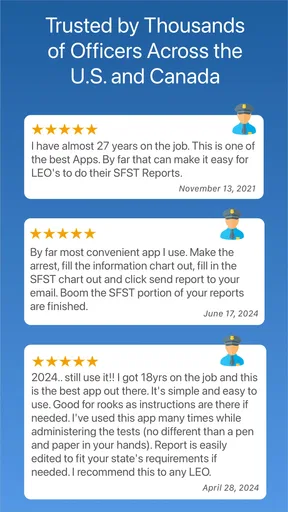
The rating of 4.2 suggests that many users find value in the concept, while the modest number of ratings means I would still test it in the exact environment where it will be used. That trial should focus less on whether the app looks convenient and more on whether users can complete accurate reports, review them consistently, and move them into the organization’s approved process without confusion.
My bottom line is simple: this is worth considering when you need a focused SFST reporting workflow, not when you need a general notes app or a complete case-management platform. I would recommend it to a trained professional or a small team willing to establish clear boundaries around a shared device. I would not recommend handing it to untrained household users or treating it as a replacement for policy, supervision, or careful judgment.
Verdict
Strengths of SFST Report – Unofficial Tool
- Quickly checks SFST-related information from a mobile device.
- Simple interface makes the main report details easy to find.
- Useful for users who need occasional access while away from a computer.
- Lightweight design should work well on many Android devices.
- Unofficial status can provide a convenient alternative to official channels.
Limitations of SFST Report – Unofficial Tool
- Not affiliated with the official SFST service or its developers.
- Information may become outdated if the underlying service changes.
- Availability and accuracy depend on the connected SFST data source.
- May offer limited support if reports fail or display incorrectly.
- Users should avoid entering sensitive credentials unless clearly required.
Similar Picks in This Category
View All
LinkedIn: Community & Network
LinkedIn3.8

Zoom Workplace
zoom.com4.1

Microsoft Teams
Microsoft Corporation4.6

Meta Business Suite
Meta Platforms, Inc.4.6

Webex Meetings
Cisco Systems, Inc.4.5

TeamViewer Remote Control
TeamViewer4.4
Frequently Asked Questions
What is SFST Report – Unofficial Tool used for?
SFST Report – Unofficial Tool is designed to help users access and organize information related to SFST reports through an unofficial mobile interface. It may simplify viewing, checking, or managing report details, depending on the available features and the connected service. Because it is unofficial, users should verify important information through the official source before relying on the app for legal, administrative, or professional decisions.
Is SFST Report – Unofficial Tool an official application?
No. The app is presented as an unofficial tool, which means it is not necessarily developed, endorsed, or maintained by the organization associated with SFST reports. This distinction is important because features, branding, data availability, and reliability may differ from the official platform. Before entering sensitive information or acting on displayed results, compare the app’s information with official documentation and use appropriate caution.
Does the app require an account or personal information?
The information required can vary according to the app version and the services it supports. Some functions may work without registration, while access to report-related features could require credentials, identifiers, or other personal details. Before continuing, review the requested permissions and privacy policy carefully. Avoid providing passwords, identification numbers, or sensitive data unless you are confident about the app’s source and security.
Can I trust the information shown in the app?
The app may be useful for convenience, but its information should not automatically be treated as an official record. Unofficial tools can experience delayed updates, compatibility problems, incomplete data, or errors caused by changes to the original service. If the displayed report affects employment, legal matters, compliance, or another important decision, confirm every relevant detail directly through the official channel.
Is SFST Report – Unofficial Tool safe to download and use?
Safety depends on where you download the application, how frequently it is updated, and the permissions it requests. Install it only from a reputable store or verified source, check recent user reviews, and inspect the developer information before proceeding. Be cautious if the app requests unrelated permissions, redirects you to unknown websites, or asks for confidential credentials without clearly explaining why they are needed.
